Sale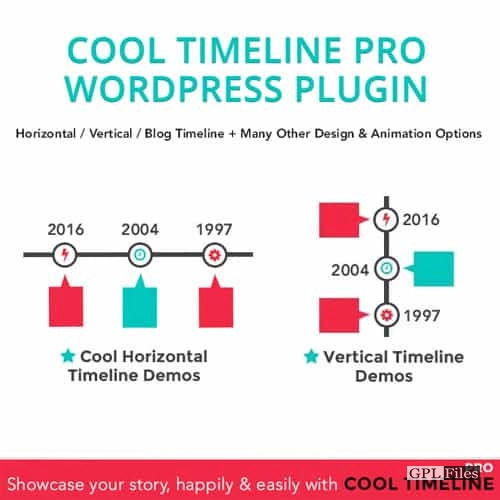
Cool Timeline Pro 4.8.7
Original price was: $14.99.$3.99Current price is: $3.99.

Cool Timeline Pro
Create Awesome Story Timeline Using Images, Videos & Slide-Show
Using a timeline, you may display your narrative in a visually striking way by inserting photographs, videos, slide shows, as well as a specialised theme-based layout and colour scheme. This timeline plugin has a simple short-code that allows it to be used everywhere.
Cool Features of Cool Timeline Pro
- There are four distinct timeline formats available inside Cool Timeline Pro.
- Fonts and colours: Cool Timeline Pro’s advanced settings panel makes it simple to change the font size, colour, and style of text as well as the backdrop and elements of a timeline.
- Display Videos, Images, and Slideshows using Cool Timeline Pro’s Built-in Video, Image, and Slideshow Viewers. Including one in your timeline tale is simple.
- With Cool Timeline Pro’s powerful custom colour function, you can simply make a multicoloured timeline by assigning a unique colour to each story as it’s added.
- Use the Cool Timeline Pro WordPress plugin to make many timelines for your site, each focused on a unique topic. These timelines can be displayed in a horizontal or vertical orientation, and with any design you like.
- Quickly Insert a Shortcode with the Help of an Intelligent Generator:- You can easily insert a shortcode into any page using the smart shortcode generator tool within your code editor if you are using the traditional code editor within WordPress while creating a new page or post.
- You Can Quickly Insert a Timeline Using Gutenberg Blocks, Elementor, or WPBakery After individual stories have been published, displaying them in a chronological format is as simple as using any page builder: Gutenberg, Elementor, or WPBakery blocks.
- Sequence of Events Using Elementor Custom Label / Text: ELEMENTOR VERTICAL AND HORIZONTAL TIMELINE In Place Of The Date, Display A User-Defined Label One of the many useful features of Cool Timeline Pro is the ability to replace the standard timeline date/time format with user-supplied text. When adding a timeline tale, you may modify the content and the sequence of the stories using a few easy options.
- Schedule, in ASC/DSC Order In Any Sequence With the help of the ASC / DESC Timeline shortcode, you may display the timeline in either ascending or descending order, depending on your preferences.
- Incorporate Filters Into Timeline Users can view many timelines, each based on a different category, simply by using the filters displayed above the timeline.
- Date Range for Blog Entries Using Cool Timeline Pro, you can display your website’s blog articles in a timeline format on any page. Additionally, by including the slug of the desired post type in the timeline shortcode, any post type can be shown in the timeline format.
- Support for Ajax’s Load More and Pagination Features These functions—pagination and load more—are available in Cool Timeline Pro. If your timeline has a large number of tales, you may wish to implement pagination or a load more button after a fixed amount of entries.
- Scrolling Menus: Minimal Scrolling Menus It is possible to display a compact scrolling navigation within your timeline page for speedy page transitions. This compact timeline navigation makes it simple for the user to jump to any given year’s worth of stories.
- Timeline Icons: Use FontAwesome or Your Own Images Each entry in your timeline can have a fontawesome or custom image icon shown next to it.
- Embedded HTML/Links/Read More: – Display HTML/Links/Read More in the Timeline It is possible to include links, bold text, and other custom HTML tags into timeline stories, in addition to displaying a “read more” button that can be set to direct readers to a full story page or another URL of your choosing.
- Put Any Date Format You Want Inside The Timeline Just include the appropriate date format in your shortcode, and the timeline’s dates will appear in the format you want.
- Movements: 15+ Animated Effects Among its many features, Cool Timeline Pro’s extensive library of animations includes more than fifteen that provide a unique flair to your timelines.
- For Professionals Only: Premium Service Our Pro subscribers receive priority access to our customer service team. If you run into any trouble while making your ideal timeline on your site, let us know.
Related products
-
Sale

Formidable Forms - Quiz Maker 3.1.4
Original price was: $14.99.$3.99Current price is: $3.99. -
Sale
Scroll Magic WordPress - Scrolling Animation Builder Plugin 5.0.3
Original price was: $14.99.$3.99Current price is: $3.99. -
Sale
WooCommerce Page Builder For Elementor 1.1.6.7
Original price was: $14.99.$3.99Current price is: $3.99. -
Sale
Modula Pro 2.8.21
Original price was: $14.99.$3.99Current price is: $3.99. -
Sale
JetWooBuilder For Elementor 2.2.3
Original price was: $14.99.$3.99Current price is: $3.99. -
Sale
Toolset Framework Installer 3.1.18
Original price was: $14.99.$3.99Current price is: $3.99. -
Sale
WooCommerce Abandoned Cart Recovery 1.1.4
Original price was: $14.99.$3.99Current price is: $3.99. -
Sale
Toolset Module Manager 1.8.6
Original price was: $14.99.$3.99Current price is: $3.99.