Coupon Theme 2.2.2
Original price was: $14.99.$3.99Current price is: $3.99.

Coupon Theme
If you’ve made a recent online purchase, you almost certainly looked for a discount code as soon as you saw that field, right?
Everyone, not just you, does something similar while shopping online these days. Why pay full price if there’s a chance you can get a discount?
This is exactly why coupon websites have become so common. Groupon.com is just one example of a company that has grown to a multibillion dollar valuation by offering discounts and coupons to its users.
It doesn’t take much money to get started, especially if you choose a coupon theme for your new site’s backend.
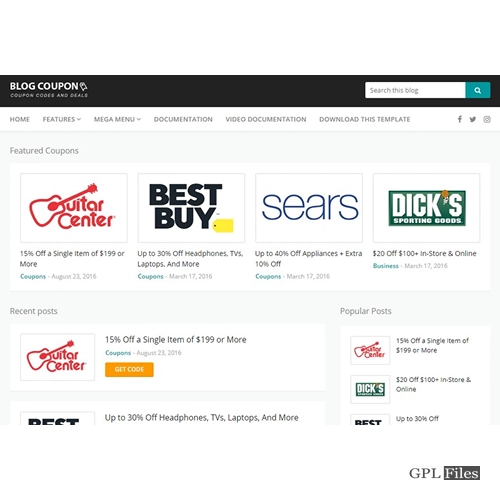
The Coupon theme is quite striking visually and performs superbly. Both the main page and the discount details page are beautifully designed.
General Settings
- Include a Logo
- Include a Favicon
- Mobile Device Touch Icon
- Include a Metro Icon.
- Twitter Username Field
- Option for Feedburner URL
- Header Section Code Entry Field
- Option for Footer Code
- Options for Pagination
- Enable/Disable AJAX Quick Search
- Turn on/off responsiveness
- Enable Support for Right to Left
- Pick the number of products
Performance Options
- Prefetching Enabled or Disabled
- Enable/Disable Lazy Load
- Enable JavaScript for Async
- Discard ver Parameters
Styling Options
- Select Primary Color Scheme
- Use of Secondary Colors
- Select a layout style
- Add Your Own or Choose from 60 BG Image Options
- A parallax effect for background images
- Fill your Custom CSS Field using CSS
- Lightbox Option to Enable and Disable
Header
- Background of the Top Bar
- Display the Header Search Form
- Placeholder for the header search
- Display Header Registration and Login Form
- Background Navigation
- A floating menu of options
- Menu visibility
- Display or Remove the Logo
Footer Settings
- Make Footer Widgets active
- Turn on the 3- or 4-widget layout.
- Pick a background for the footer
- Parallax on Footer BG enabled
- Additional Footer Text
- Title in Footer Text
- Footer Text Information
- Footer Social Icons
- Title of Footer Social Icon
- Footer Social Icons
- Copyrights Text Section
- The Origins of Copyright
Homepage Settings
- Planner of Layouts
- Page Title for Carousel
- Items in a Carousel
- Add Carousel to External Sites
- Create Your Own Slider
- Determine How the Slider Will Move Animatically
- To be used as a Slider Text Background
- The Parallax Slider Effect Should Be Enabled.
- Tabs for Coupon Groupings Needed
- Pick the Total Number of Comments
- Customize Tab Background Color
- Toggle Parallax Tabs On
- Please Enable the Social Icons on the Homepage
- Insert New Title Here
- Adjust the Title Color of a Section
- Include Icons for Popular Networks
- Department Name in the Store Title
- Shop Best Sellers and More
- Color for Storefront Background Set
- Customize the Subscribe Page’s Background Color
- Background of the Signup Page
- List Your Name Here
- Sign Up Name Color Title
- To Join Click Here!
- A Background Color For The Sign Up Button
- Content for the Sign Up Button
- URL of Join Button
Coupon Archive
- Tile default for coupon archives
- Minimize Description Size
- Limit on Coupons Issued
- Select the Sidebars from the Coupon Archive
- Don’t Include Coupons That Have Previously Expired
- Coupon Post Meta Data Archive
- Coupons Archive – Page Break Format
Coupon Single
- Single Post Format for Coupons
- Meta Data For A Single Coupon Post
- Show Coupon Button Action
- Pop-Up Subscription Form
Blog Settings
- Emphasis on Popular Topics
- Format of Page Breaks
- Entries in weblogs
- Metadata for a Blog Entry
- Format Style Date
- Lightbox: Enabled
Single Post Settings
- Single Post Template Creator
- Set Visible Metadata
- Breadcrumb Options: On/Off
- Underline Author’s Response
- Post Date in Replies
Social Settings
- Position of Share Buttons for Social Media
- Insertion of Share This and Other Buttons Into Web Pages
- A Collection of Shareable Social Media Icons
Ad Management
- Below Ad Title in Post
- Incorporate Ads After XX Days
- Promoted Content Area Below Blog Posts
Sidebar Settings
- Add Your Own Sidebars
- Homepage Sidebar Option:
- Make a Sidebar for a Single Post
- When Viewing Individual Pages, Select the Sidebar Option
- Add an Archive Section to Your Sidebar
- Choose Categories in the Sidebar Archive
- Date Archive Sidebar Options
- Author Archives Have Their Own Unique Sidebar
- A Search Page-Specific Footer
- An Error 404 Sidebar
- Online Stores Have Their Own Unique Sidebar
- Make a Separate Sidebar for Product Detail Pages
Related products
-
Sale

Scroll Magic WordPress - Scrolling Animation Builder Plugin 5.0.3
Original price was: $14.99.$3.99Current price is: $3.99. -
Sale
FS Poster GPL - WordPress auto poster & scheduler 7.4.1
Original price was: $14.99.$3.99Current price is: $3.99. -
Sale
WooCommerce Abandoned Cart Recovery 1.1.4
Original price was: $14.99.$3.99Current price is: $3.99. -
Sale
WP Mail SMTP Pro 4.5.0
Original price was: $14.99.$3.99Current price is: $3.99. -
Sale
WooCommerce Shipping Tracking 42.0
Original price was: $14.99.$3.99Current price is: $3.99. -
Sale
Formidable Forms - Quiz Maker 3.1.4
Original price was: $14.99.$3.99Current price is: $3.99. -
Sale
WooCommerce Page Builder For Elementor 1.1.6.7
Original price was: $14.99.$3.99Current price is: $3.99. -
Sale
Qubely Pro 1.4.3
Original price was: $14.99.$3.99Current price is: $3.99.